


When development begins on a new medical, industrial, or automation system, most of the attention is focused on the core components – motors, controllers, sensors, electronics, and software.
The footswitch is often viewed as a secondary component that can be selected later in the design process.
In reality, it frequently becomes one of the most complex elements of the entire project.
What initially appears to be “just a simple footswitch” quickly turns into a long list of design requirements:
- Number of pedals
- Switching technology
- Bluetooth or wired connectivity
- USB or electrical interface
- Ingress protection (IP) rating
- Pedal colors
- Labels and graphics
- Custom connectors
- Cable length
- Regulatory compliance
- Ergonomics
- Prevention of accidental activation
At this stage, many engineers conclude that a completely new footswitch must be designed.
In most cases, however, that is not the most efficient approach.
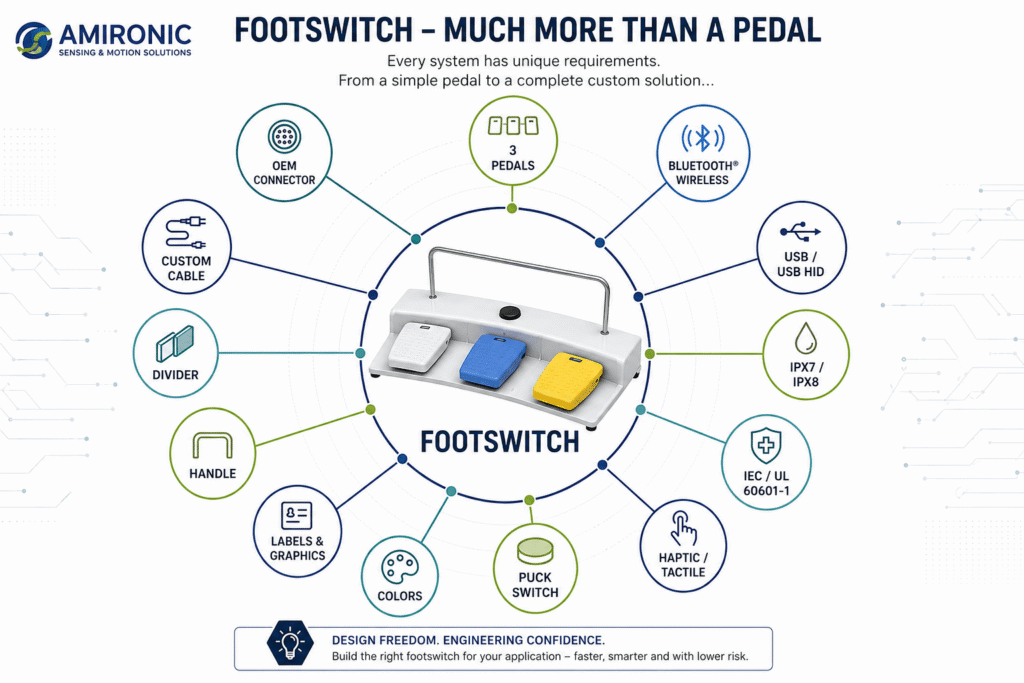
Figure 1 – In most projects, a footswitch is not a single off-the-shelf product, but a modular combination of configurable options designed to meet the specific requirements of the application and its users.
Application Requirements
│
Choose Base
│
1 / 2 / 3 / 4 / 5 Pedals
│
Add Options
│
Puck
Haptic
USB
Bluetooth
Divider
Handle
│
Choose Cable
│
Choose Connector
│
Choose Labels
│
Finished OEM Footswitch

Figure 2 – Experienced engineers don’t begin by selecting a footswitch. They begin by defining the application’s requirements. Only then can the optimal footswitch solution be selected or configured.
Modular Thinking in Practice
To better understand the advantages of a modular platform, let’s look at a few practical examples.
In each case, the same product family is used, but every application is configured differently to meet its specific requirements.
Example 1 – Medical Laser System
In a medical laser system, the operator must switch quickly between multiple operating modes.
A typical configuration might include:
- Two pedals for laser operation
- A Haptic button for mode selection
- Carry handle
- Pedal divider to prevent accidental activation
- IPX7 protection for cleaning and disinfection
- Color-coded pedals for immediate identification
There is no need to design a new footswitch. The appropriate configuration is simply assembled from the modular platform.
Example 2 – Industrial Equipment
A manufacturing machine presents a completely different set of requirements.
A typical configuration might include:
- One large pedal
- Extended cable length
- Industrial connector
- Higher ingress protection (IP) rating
- Operation while wearing safety footwear
- Increased operating force
Although the application is entirely different, the same modular platform can be configured to suit the operating environment.
Example 3 – An Entire Product Family
Imagine a medical equipment manufacturer developing three versions of the same product:
- Basic
- Professional
- Premium
Each version requires a different set of footswitch functions.
Without a modular platform, this could mean three separate footswitch designs, three different products, and three independent support and maintenance processes.
With a modular platform, however, all three versions can be built on the same proven architecture. This simplifies manufacturing, reduces the number of unique components, streamlines inventory management, and maintains a consistent product design across the entire product family.
Beyond Customization – A Business Advantage
The benefits of a modular platform extend far beyond engineering.
They also have a significant impact on the product’s entire lifecycle.
Among the key advantages are:
- Shorter development time
- Fewer unique components
- Simplified manufacturing and assembly
- Reduced inventory complexity
- Easier service and long-term support
- Straightforward expansion of future product variants
For OEM manufacturers, these advantages translate into lower costs, reduced engineering risk, and a faster path from concept to production.
Modular Platform
Requirements
↓
Configuration
↓
Validation
↓
Production
Traditional Development
Requirements
↓
New Design
↓
Prototype
↓
Testing
↓
Certification
↓
Production
Conclusion
For many years, footswitches were viewed as standard components selected from a catalog.
Today, in advanced medical, industrial, and OEM applications, that approach is no longer sufficient.
A footswitch is an integral part of the user interface, directly influencing usability, safety, reliability, and the overall performance of the system.
The question is no longer:
“Which footswitch should we buy?”
Instead, it should be:
“How can we create the right operator interface for this application?”
By using a modular platform, engineers can configure the number of pedals, switching technologies, communication interfaces, cables, connectors, colors, labels, and accessories – all without starting each project from scratch.
For manufacturers of medical devices, industrial equipment, and OEM systems, this approach shortens development time, reduces engineering risk, maintains design consistency, and supports the creation of an entire product family based on a single proven platform.
Ultimately, the goal is not to select the best footswitch.
The goal is to configure the right footswitch for the application.
And that is the difference between purchasing a component and engineering a solution.
Looking for the Right Footswitch for Your Next Project?
Whether you’re developing a medical device, industrial machine, OEM product, or another specialized system, the best place to start is by defining the application’s requirements rather than selecting a product from a catalog.
At Amironic, we help engineers and OEM manufacturers configure HERGA footswitch solutions ranging from simple cable, connector, and color modifications to complex modular configurations featuring multiple pedals, USB or Bluetooth connectivity, Puck and Haptic buttons, and application-specific customization.
If you’re wondering whether an existing modular platform can meet your requirements instead of developing a new footswitch from scratch, we’d be happy to help.
Case Study – How a Modular Platform Eliminated the Need for a New Footswitch Design
A medical device manufacturer needed a dedicated footswitch for a new system under development. During the initial specification phase, the project appeared to require the design of an entirely new footswitch.
However, after reviewing the application requirements, it became clear that every requirement could be met using the HERGA 6256 Modular Footswitch Platform, eliminating the need for a new mechanical design.
| Customer Requirement | HERGA 6256 Solution |
|---|---|
| Three independent control functions | ✓ Three-pedal configuration |
| Prevention of accidental activation | ✓ Integrated pedal dividers |
| Easy transportation between workstations | ✓ Carry handle |
| Integration with the customer’s equipment | ✓ 3-meter cable with custom connector |
| Intuitive function identification | ✓ Color-coded pedals and customized labeling |
| Frequent cleaning and disinfection | ✓ IPX7-rated platform |
| OEM branding | ✓ Custom labels and company logo |
Instead of investing time and resources in developing a new enclosure, the final solution was configured using a proven modular platform. Every application requirement was achieved through standard modules and accessories while delivering the appearance and functionality of a fully customized product.
Results
- No new mechanical design required
- No new tooling investment
- Lower engineering risk
- Shorter development time
- A scalable platform that can support future product generations
Key takeaway: Before designing a new footswitch, it is worth evaluating whether an existing modular platform can be configured to deliver the same functionality more efficiently.
In this case, seven different application requirements were fulfilled using a single modular platform – without developing a new footswitch from scratch.
When Is Customization Not the Right Choice?
After seeing the flexibility offered by a modular platform, it’s easy to assume that every project requires a customized solution.
In reality, that’s not always the best approach.
A good engineer doesn’t aim for the highest level of customization. The goal is to find the simplest solution that meets all of the application’s requirements.
Before requesting a custom modification, it’s worth asking one important question:
Will this change actually add value to the product?
Customizations That Usually Make Sense
Many modifications are relatively simple to implement and can significantly improve usability and system integration.
Typical examples include:
- Custom cable length
- Application-specific connector
- Color-coded pedals
- OEM labels and branding
- Carry handle
- Pedal dividers
- Puck or Haptic buttons
These changes typically do not alter the platform’s core architecture, yet they can make the product easier to use, safer to operate, and simpler to integrate into the final system.
Customizations That Should Be Carefully Evaluated
Other modifications can have a significant impact on development cost, lead time, and project complexity.
Examples include:
- Redesigning the mechanical enclosure
- Creating new production tooling
- Changes requiring requalification or regulatory reassessment
- Developing new electronics
- Adding communication interfaces that are not supported by the platform
In these cases, it’s important to determine whether the added value truly justifies the additional investment.
In many situations, the same objective can be achieved by intelligently configuring existing modules rather than developing an entirely new solution.
Start with the Requirements, Not the Solution
One of the most common mistakes in OEM projects is arriving at the first design meeting with a predefined technical solution before fully understanding the application’s requirements.
A more effective approach is to begin with a few fundamental questions:
- What does the operator need to accomplish?
- In what environment will the system operate?
- What mechanical, electrical, or operational constraints exist?
- Which standards and certifications must be met?
- How might the product evolve in future generations?
Only after answering these questions should you decide whether an existing product, a modular platform, a simple configuration change, or a completely new design is the most appropriate solution.
In many cases, the best solution is simpler, faster, and more cost-effective than initially expected.
A Final Thought
A well-known engineering principle states:
“The best design is the simplest design that meets all the requirements.”
The same principle applies when selecting a footswitch.
The objective is not to maximize customization.
The objective is to apply only the customizations that truly matter.
🧩 Further Reading
This article is part of a broader series exploring how footswitches function as critical human-machine control interfaces across medical and industrial systems. For additional technical context and application insights, you may also find the following articles useful:
- HERGA Control Solutions: More Than a Footswitch – The Human Interface That Defines System Performance
- HERGA Medical Footswitches: Engineering the Right Control Interface for Clinical Systems
- HERGA Industrial Footswitches: Reliable Control Solutions for Harsh and High-Duty Environments
- Pneumatic Footswitches in Medical and Aesthetic Equipment
- Industrial Safety Footswitches: Reliable Machine Control for Heavy-Duty and High-Risk Environments
- Wired vs Wireless (Bluetooth) Footswitches: When Does It Actually Matter?
- Footswitches for Medical and Aesthetic Laser Systems – Not Just a Trigger, but a Critical Part of System Safety
- Medical Footswitches for IEC / UL 60601-1 Systems – Safety, Reliability and Design Considerations Every Engineer Should Know
- 6 Switching Technologies Every Systems Engineer Should Know – And How to Choose the Right One
- Why Foot Switches Fail – And What Experienced OEM Designers Do Differently
- Pneumatic Foot Bellows vs. Electrical Footswitch – Do You Really Need to Run Electricity to the Foot Pedal?
- Momentary or Latching? How to Choose the Right Switch for Industrial, Medical, and OEM Applications
- Why Did Your Footswitch Fail After Just Six Months – Even Though It Was Rated for One Million Operations?
- USB Foot Pedals for Medical & Industrial Systems – Why the USB Connector Is Only Part of the Story
Frequently Asked Questions (FAQ)
Can a footswitch be customized for an OEM application?
Yes. Modular platforms can be configured with a wide range of options, including the number of pedals, colors, cables, connectors, labeling, carry handles, and other accessories to meet the specific requirements of an application.
Does every customization require the development of a new footswitch?
No. In many cases, customer requirements can be met by configuring existing modules within a modular platform, eliminating the need for new mechanical or electronic development.
When should a completely new footswitch be considered?
A new design should be considered only when the application requirements cannot be met using an existing platform, such as when a unique mechanical design, new operating technology, or functionality beyond the capabilities of current products is required.
What aspects of a footswitch can be customized?
Depending on the platform, customization options may include the number of pedals, switch technologies, cable length, connector type, pedal colors, labeling, OEM branding, carry handles, safety dividers, and other accessories.
Can a single footswitch include more than two pedals?
Yes. Many modular platforms support multiple pedal configurations, allowing the footswitch to be tailored to the application’s functional and ergonomic requirements.
Are USB and Bluetooth versions available?
Yes. Many modular platforms are available with USB or Bluetooth connectivity, depending on the product family and application requirements.
How does a modular platform reduce development time?
Instead of designing a new product from the ground up, engineers configure an existing, proven platform with only the modifications required. This approach reduces engineering risk, shortens development time, and accelerates the transition to production.
How should a footswitch be selected for a new project?
The first step is not choosing a model but defining the application’s requirements, including the required functions, operating environment, safety considerations, communication interface, operating method, and future expansion plans. Based on these requirements, the most appropriate solution can then be selected, whether it is a standard product, a modular platform, or a completely new design.
Should a footswitch be selected from a catalog or based on the application?
In most cases, it is better to begin by defining the application’s requirements rather than selecting a catalog part number. Understanding how the operator interacts with the system, the required functions, and the operating environment leads to a more suitable solution while helping avoid costly design changes later in the project.
Glossary
Bluetooth Footswitch
A wireless footswitch that communicates via Bluetooth, enabling cable-free operation in medical, industrial, and OEM applications.
Cable Assembly
The cable and connector assembly that interfaces the footswitch with the host system. Cable length, connector type, and cable configuration can be customized to suit the application.
Divider
A physical barrier positioned between adjacent pedals to help prevent accidental activation, particularly when the operator is using the footswitch without looking at it.
Footswitch
A foot-operated control device that allows the user to operate equipment while keeping both hands free for the primary task.
Haptic Button
A control button that provides tactile feedback when pressed, allowing the operator to confirm activation without relying on visual confirmation.
IP Rating
An ingress protection classification that defines a product’s resistance to dust and water. The required IP rating depends on the application’s operating environment.
Modular Platform
A family of products built around configurable modules that can be combined to create multiple application-specific configurations without developing a new product.
OEM (Original Equipment Manufacturer)
A company that integrates components or subsystems into its own products and markets them under its own brand.
Puck Button
A compact, round control button positioned alongside the foot pedals to provide additional functions without increasing the number of pedals.
USB Footswitch
A footswitch that connects to a computer or control system via USB. Most USB footswitches operate as standard HID devices and do not require dedicated drivers.
User Interface (UI)
The physical interface through which the operator interacts with the system. For a footswitch, this includes the pedal layout, additional buttons, labeling, and operator feedback.
User Experience (UX)
The overall quality of the operator’s interaction with the system, including comfort, accuracy, safety, and ease of use.