


| Consideration | Professional USB Foot Pedal |
|---|---|
| Plug & Play | ✔ |
| USB HID Compliant | ✔ |
| No Driver Required | ✔ |
| Programmable Functions | ✔ |
| Multi-Key Combinations | ✔ |
| Windows / Linux / macOS Compatible | ✔ |
| Suitable for OEM Integration | ✔ |
USB Foot Pedals for Medical & Industrial Systems – How to Choose a Reliable, Driver-Free Solution
In many applications, operators need to perform actions in software while keeping both hands fully occupied.
A physician may be holding a surgical instrument or handheld medical device. A laboratory technician is handling samples. A production line operator is positioning a component with both hands. A test engineer needs to confirm a measurement without interrupting the task at hand.
In these situations, a USB foot pedal allows control to be transferred from the keyboard or mouse to the operator’s foot.
A single press can be used to:
- Capture an image
- Start a test
- Stop a measurement
- Move to the next screen
- Confirm an operation
- Start or stop recording
- Trigger a keyboard shortcut
- Perform a mouse click
- Mark an event in software
At first glance, the concept seems simple: plug the pedal into a USB port and assign an action to the switch.
However, in professional systems, the real question is not simply whether the pedal connects to a computer.
Engineers should also consider:
- How the operating system identifies the device
- Whether a dedicated driver is required
- Whether proprietary configuration software is needed
- Where the configuration is stored
- What happens when the pedal is connected to another computer
- Which keys and commands can be assigned
- Whether multiple-key combinations are supported
- Whether the mechanical design is suitable for long-term use
- Whether the enclosure is appropriate for the operating environment
- Whether the product is intended for consumer use or OEM integration
Choosing a USB foot pedal should therefore begin with understanding the application—not simply selecting a USB connector.
What Is a USB Foot Pedal?
A USB foot pedal is a computer input device.
From the operating system’s perspective, it can behave just like a keyboard or a mouse. When the user presses the pedal, it sends a predefined command to the computer.
For example, a pedal can be configured to send:
- Enter
- Space
- Any function key from F1 to F20
- Left or right mouse click
- Keyboard shortcuts such as Ctrl + S
- Keyboard shortcuts such as Alt + F4
- Multi-key combinations of up to four simultaneous keystrokes
For example, the HERGA 6210 USB Type-C Foot Pedal can be configured to send letters, numbers, function keys, navigation keys, arrow keys, and mouse clicks. It also supports modifier keys such as Ctrl, Alt, and Shift, with programming performed using internal configuration switches.
The pedal is recognized as a USB HID (Human Interface Device), eliminating the need for a dedicated software driver. According to the product specifications, it operates with Windows, Linux, and macOS simply by connecting it to a USB port.
This is particularly valuable in medical, laboratory, and industrial environments, where installing additional software may be restricted or undesirable.
USB HID – Why Is Driver-Free Operation So Important?
USB HID (Human Interface Device) is the standard used by devices such as keyboards, mice, and other human interface peripherals.
When a foot pedal is recognized as a standard USB HID device, the operating system already knows how to communicate with it.
In practice, this means:
- No manufacturer-specific driver is required
- No background software needs to be running
- No startup service is required
- No dependency on a specific operating system version
- The pedal can easily be moved to another computer
- The application software does not need dedicated support for the pedal
From the application’s point of view, pressing the pedal is simply another keyboard or mouse input.
For example, if a medical imaging application captures an image when the F8 key is pressed, the pedal can simply be programmed to send F8. The software does not need to know whether the command originated from a keyboard or a foot pedal.
This approach is especially valuable in systems where developers want to avoid modifying existing software or implementing custom communication protocols.
It also eliminates long-term dependence on proprietary configuration utilities that may become incompatible with future Windows releases or eventually reach end-of-life.
Where Is the Configuration Stored – On the Computer or Inside the Pedal?
This is one of the most important questions when selecting a USB foot pedal.
Some products require configuration software installed on the PC. In these cases, the pedal’s behavior may depend on a specific computer, user profile, or software installation.
With HERGA’s programmable USB foot pedal, the configuration is stored inside the pedal itself using internal configuration switches. The user opens the enclosure, selects the desired key or key combination, verifies the operation, and closes the housing.
This approach provides several important advantages:
- The configuration travels with the pedal
- Every computer behaves the same way
- No dependency on user profiles
- No administrator privileges are required
- The pedal can be connected to another computer without reconfiguration
- The programmed function remains unchanged after operating system updates
For OEM applications, this allows manufacturers to configure the pedal during production and deliver a complete, ready-to-use system.
For example, a medical equipment manufacturer can program the pedal to send F12, integrate it into the system, and ensure that every shipped unit behaves identically without additional setup.
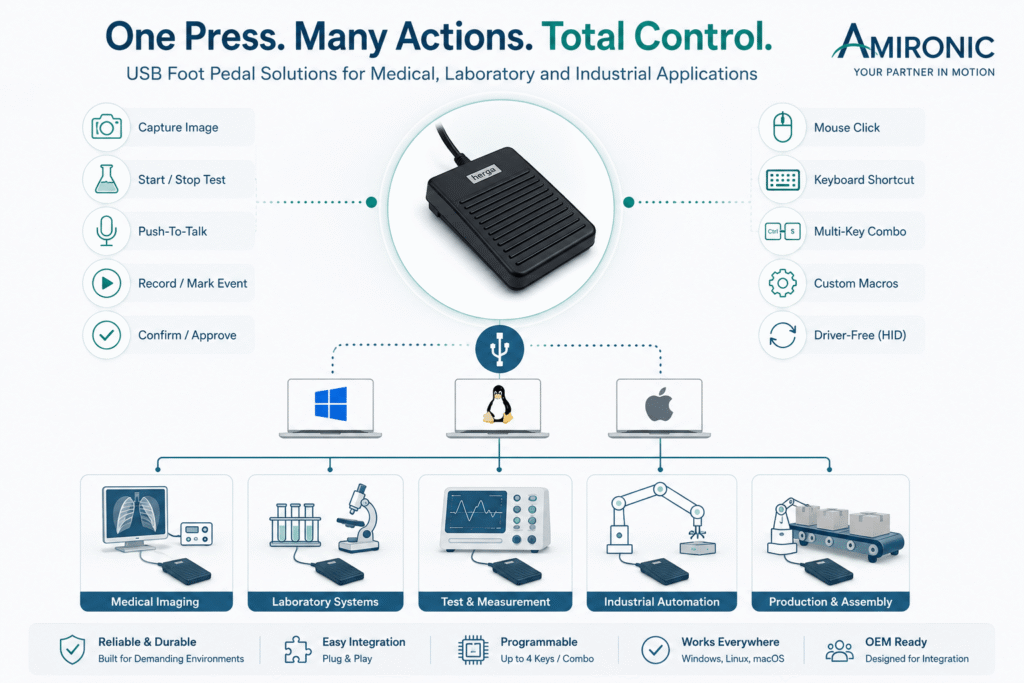
A programmable USB foot pedal serves as a Human-Machine Interface (HMI), enabling operators to control software and equipment while keeping both hands free for the task at hand.
USB Is Just the Connector – It Doesn’t Define the Quality of the Solution
When engineers search for a USB foot pedal, it’s easy to focus on the USB interface itself.
After all, the computer only needs to recognize a USB device that performs a specific action.
But this is where many purchasing decisions go wrong.
USB is simply the communication interface between the foot pedal and the computer. It says nothing about the product’s reliability, suitability for medical or industrial applications, service life, or ease of integration into a professional system.
Two foot pedals may connect to the same USB port while offering completely different levels of performance, durability, and functionality.
When evaluating a USB foot pedal for professional use, consider the following questions:
- Is it recognized as a standard USB HID device?
- Does it require a dedicated driver or proprietary software?
- Can it be moved between computers without reconfiguration?
- Is it programmable?
- Is it designed for continuous, long-term operation?
- Is its mechanical design suitable for medical or industrial environments?
In many projects, the answers to these questions are far more important than the type of USB connector itself.
Why Is USB HID Recognition Such a Major Advantage?
One of the biggest advantages of professional USB foot pedals is that they are recognized as USB HID (Human Interface Device) peripherals—just like a keyboard or mouse.
As a result, the operating system already knows how to communicate with the device, eliminating the need for dedicated drivers or additional communication software in most applications.
Once connected, the pedal can send commands directly to the computer exactly as if they were entered from a keyboard.
This provides several important benefits:
- Simple plug-and-play installation
- Compatibility with Windows, Linux, and macOS
- Easy transfer between computers
- Reduced dependence on third-party software
- Easier integration into OEM systems
Instead of developing a custom communication interface, engineers can often configure the application to respond to an existing keyboard shortcut while the foot pedal simply sends that same command.
For many projects, this approach significantly simplifies both system development and long-term maintenance.
What Commands Can a USB Foot Pedal Perform?
Many people assume that a USB foot pedal can only replace the Enter or Space key.
In reality, its capabilities are much broader.
A programmable USB foot pedal can send a wide range of commands, including:
- Letters and numbers
- Function keys (F1-F20)
- Navigation and arrow keys
- Enter, Escape, Tab, and Space
- Mouse clicks
- Keyboard shortcuts such as Ctrl + S, Ctrl + Shift + P, or Alt + F4
This flexibility allows the pedal to be integrated into almost any software application without modifying the application’s source code.
Typical examples include:
- Capturing images in a medical imaging system
- Starting or stopping measurements in testing software
- Triggering predefined functions in medical laser equipment
- Confirming the next step at an industrial test station
In other words, the foot pedal doesn’t “know” what it is controlling. It simply sends the programmed command, while the software interprets that command and performs the desired action.
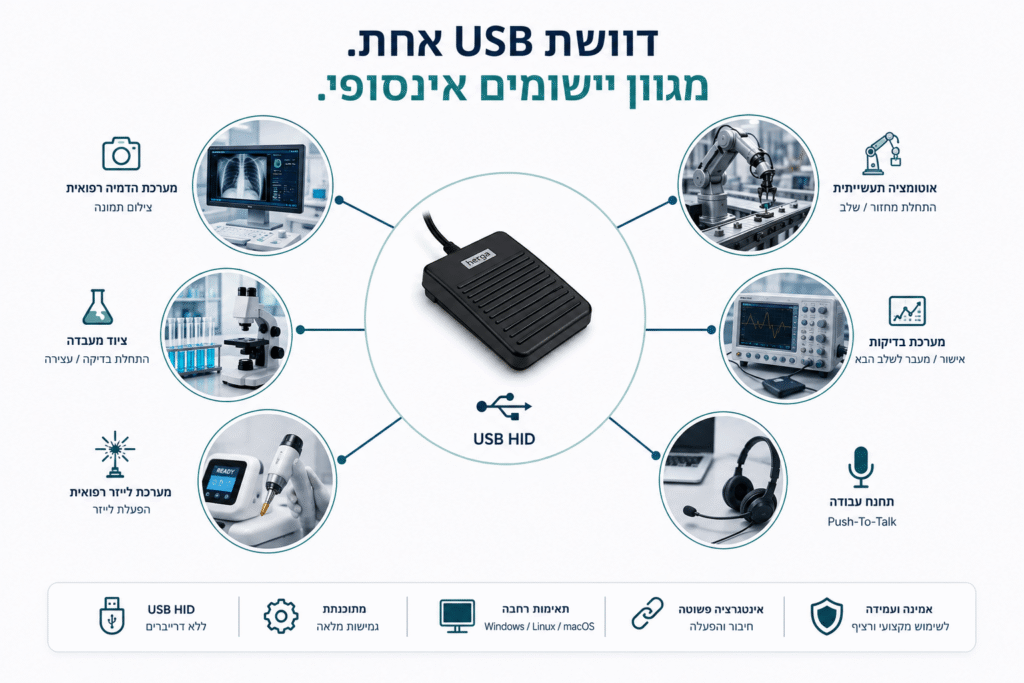
A single programmable USB foot pedal can be integrated into medical, laboratory, and industrial systems, performing a wide variety of functions through standard USB HID commands-without requiring a dedicated software driver.
Why Have USB Foot Pedals Become So Common in Professional Systems?
In the past, integrating a foot pedal into a computer-based system typically required custom development.
Engineers had to select an appropriate switch, design an electronic interface, develop a communication protocol, and write software capable of detecting pedal presses and triggering the desired action.
Today, this level of development is often unnecessary.
A programmable USB foot pedal allows the operating system to recognize the pedal just as it recognizes a keyboard or mouse. As a result, foot control can often be added with little or no modification to existing software.
In many applications, all that is required is assigning a keyboard shortcut or mouse function to the pedal and linking that command to the desired operation.
This approach reduces development time, simplifies system integration, and minimizes long-term maintenance.
When Both Hands Are Busy, the Foot Becomes the Natural Control Interface
One of the greatest advantages of a USB foot pedal is that it allows operators to perform software commands without taking their hands away from the task.
This provides significant benefits across a wide range of applications.
In medical imaging systems, physicians can capture images without releasing the probe or handheld instrument.
In laboratories, technicians can start or stop measurements while continuing to handle samples.
In medical laser systems, predefined functions can be activated while maintaining full control of the equipment.
At industrial test stations, operators can confirm the next step in the process without letting go of the product being inspected.
Production lines and automated manufacturing systems also benefit from foot-operated controls, allowing repetitive tasks to be performed quickly while maintaining a smooth workflow.
In all of these examples, the objective is not to replace the keyboard, but to improve the Human-Machine Interface (HMI) by making operation more efficient, intuitive, and ergonomic.
System Compatibility Is More Important Than the Number of Features
USB foot pedals are often compared based on the number of programmable functions or available configuration options.
While these specifications are important, they are not the only factors that matter.
For professional applications, engineers should also ask:
- Will the pedal continue to operate after operating system updates?
- Can it be moved to another workstation without additional configuration?
- Can the computer be replaced without reprogramming the pedal?
- Can operators begin using it immediately after connection?
- Is it designed for reliable, everyday operation over many years?
In many cases, a simple, stable, and highly reliable solution provides greater long-term value than a product packed with features that are rarely used.
This is one reason why engineers developing medical devices, laboratory equipment, and OEM systems often prefer solutions based on proven industry standards rather than proprietary software.
What Should You Consider Before Choosing a USB Foot Pedal?
Before selecting a USB foot pedal for a new project, consider more than just the USB connector.
Operating System Compatibility
Does the pedal work with Windows, Linux, and macOS without requiring a dedicated driver?
Programming Capabilities
Which keys, keyboard shortcuts, or mouse functions can be assigned?
Standard USB HID Support
Is the pedal recognized as a standard USB HID device, or does it require proprietary communication software?
Mechanical Reliability
Is it intended for occasional office use, or is it designed for continuous operation in demanding professional environments?
Environmental Suitability
Is it appropriate for laboratories, medical treatment rooms, industrial test stations, or manufacturing facilities?
OEM Integration
Can it be incorporated into the final product so customers receive a fully configured, ready-to-use system?
Evaluating all of these factors together makes it much easier to select a solution that will continue to perform reliably throughout the product’s lifetime, rather than simply meeting the initial requirement for “a USB foot pedal.”
Are USB Foot Pedals Suitable for OEM Systems?
Absolutely.
Manufacturers of medical equipment, laboratory instruments, test systems, and industrial machinery frequently integrate USB foot pedals directly into their products.
From the operator’s perspective, the pedal becomes another input device, just like a touchscreen or control panel.
For the equipment manufacturer, a USB foot pedal simplifies development, reduces integration effort, and leverages a standard interface already supported by modern operating systems.
When the pedal is selected during the design phase, it can be preconfigured before shipment, allowing every system to arrive fully operational without requiring additional software installation or complex setup procedures.
Conclusion
A USB foot pedal is far more than a simple replacement for the Enter key.
In medical devices, laboratory equipment, industrial test stations, and manufacturing systems, it serves as a Human-Machine Interface (HMI) that enables operators to work more comfortably, efficiently, and safely while keeping both hands focused on the task.
When selecting a USB foot pedal, engineers should evaluate much more than the USB connector itself.
Consider whether the pedal:
- Is recognized as a standard USB HID device
- Operates without dedicated drivers
- Can be programmed for the required functions
- Is suitable for the intended environment
- Provides the long-term reliability expected from professional equipment
By considering these factors, engineers can select a solution that will continue to support their system long after development has been completed.
🧩 Further Reading
This article is part of a broader series exploring how footswitches function as critical human-machine control interfaces across medical and industrial systems. For additional technical context and application insights, you may also find the following articles useful:
- HERGA Control Solutions: More Than a Footswitch – The Human Interface That Defines System Performance
- HERGA Medical Footswitches: Engineering the Right Control Interface for Clinical Systems
- HERGA Industrial Footswitches: Reliable Control Solutions for Harsh and High-Duty Environments
- Pneumatic Footswitches in Medical and Aesthetic Equipment
- Industrial Safety Footswitches: Reliable Machine Control for Heavy-Duty and High-Risk Environments
- Wired vs Wireless (Bluetooth) Footswitches: When Does It Actually Matter?
- Footswitches for Medical and Aesthetic Laser Systems – Not Just a Trigger, but a Critical Part of System Safety
- Medical Footswitches for IEC / UL 60601-1 Systems – Safety, Reliability and Design Considerations Every Engineer Should Know
- 6 Switching Technologies Every Systems Engineer Should Know – And How to Choose the Right One
- Why Foot Switches Fail – And What Experienced OEM Designers Do Differently
- Pneumatic Foot Bellows vs. Electrical Footswitch – Do You Really Need to Run Electricity to the Foot Pedal?
- Momentary or Latching? How to Choose the Right Switch for Industrial, Medical, and OEM Applications
- Why Did Your Footswitch Fail After Just Six Months – Even Though It Was Rated for One Million Operations?
Frequently Asked Questions (FAQ)
Does a USB foot pedal require a software driver?
Not necessarily. USB foot pedals that comply with the USB HID (Human Interface Device) standard are recognized by modern operating systems as standard input devices and typically do not require a dedicated driver.
Can the same USB foot pedal be used with Windows, Linux, and macOS?
Yes. As long as the pedal functions as a standard USB HID device, it can generally operate with Windows, Linux, and macOS without requiring hardware modifications or platform-specific drivers.
Can I program keyboard shortcuts?
Yes. Programmable models allow individual keys as well as keyboard shortcuts such as Ctrl + S, Ctrl + Shift + P, Alt + F4, and many other key combinations, depending on the model.
Will a USB foot pedal work with any software?
In most cases, yes. Because the pedal sends standard keyboard or mouse commands, virtually any application that responds to those commands can be operated using a USB foot pedal.
What are the advantages of a USB foot pedal compared to a conventional switch?
A USB foot pedal connects directly to the computer without requiring custom interface electronics, communication hardware, or dedicated software drivers. This simplifies system integration and allows hands-free control to be added with minimal development effort.
Are USB foot pedals only used in medical applications?
No. While they are widely used in medical devices, USB foot pedals are also common in laboratory equipment, industrial test systems, manufacturing automation, multimedia workstations, machine control systems, and many OEM applications.
Glossary
Driver
Software that enables the operating system to communicate with a hardware device. Standard USB HID devices typically operate without requiring a dedicated driver.
Hands-Free Operation
A method of operating equipment using a foot pedal or another input device, allowing the operator to keep both hands free for the primary task.
HID (Human Interface Device)
A standard USB device class for input peripherals such as keyboards, mice, and foot pedals. HID devices are automatically recognized by most modern operating systems.
HMI (Human-Machine Interface)
The interface through which a user interacts with a machine or system. A USB foot pedal is an example of an HMI that enables hands-free control.
Keyboard Emulation
The ability of a USB device to send keyboard keystrokes to a computer, allowing software to recognize it as if the commands were entered from a standard keyboard.
Macro
A predefined sequence of keyboard commands or actions that is executed automatically in response to a single user input.
Mouse Emulation
The ability of a USB foot pedal to perform mouse functions such as left-click, right-click, or middle-click.
OEM (Original Equipment Manufacturer)
A company that integrates components from multiple suppliers into a finished product sold under its own brand.
Plug and Play
The ability of a device to function immediately after being connected to a computer, without requiring additional software installation or complex configuration.
Programmable Foot Pedal
A foot pedal that can be configured to send specific keyboard commands, mouse actions, or keyboard shortcuts when pressed.
Push-to-Talk (PTT)
A control method in which the user presses and holds the foot pedal to activate voice communication, releasing it to end transmission.
USB HID
The implementation of the USB Human Interface Device standard, allowing operating systems to recognize the device automatically without requiring dedicated drivers.
USB Foot Pedal
A foot-operated input device that connects directly to a computer via USB and is used to trigger keyboard commands, mouse actions, or application shortcuts in medical, laboratory, industrial, and OEM systems.