flagעברית
flagEnglish
3 Rabinovich St., Petah-Tikva, Israel
+972 3 9047744
office@amironic.co.il
Facebook
Twitter
LinkedIn
YouTube
  • Products
    • MEMS Inertial
      • Gyros & Accels
      • IMU
      • Inertial Navigation
      • AHRS
    • Circuit Breakers
      • Airpax Circuit Breakers
      • Electronic Circuit Breakers
      • Aircraft Circuit Breakers
      • Thermal Circuit Breakers
      • Sealing Solutions & Guards
    • Footswitches
      • Pedals & Bellows
      • USB
      • Air Switches
      • Medical
      • Modular Bases System
      • Industrial
      • Foot Potentiometers
      • Wireless
    • Mechanical & Transmisions
      • Gears
      • Sealing Solutions
      • Gearboxes
      • Couplings
      • Shafts & Bearings
      • Fasteners
      • Mechanical & Springs
      • Linear Motion
      • Anti-Vibration
    • Sensors
      • Thermostats
      • Temperature
      • Position
      • Pressure
      • Speed
      • Level Sensor
      • Load Cells
      • Flex Sensors
      • Membrane Potentiometer
    • Motors
      • Geared DC
      • Brushless DC
      • Step Motors with Gearbox
      • Torque Motors & Brushless Servo
      • DC Motors
    • Electronics
      • Xenon & IR Lamps
      • Counters & Meters
      • Microelectronics Packaging
      • Waterproof Switches
      • Micro Switches
    • Hand Control
      • Operator Controls (JOYSTICK)
      • Electrical
      • Pneumatic (Medical)
      • USB Hand Control
      • Air Push Button
      • Pressure Switch
      • IR Switch
    • Power Solutions
      • Rugged & Military Power Supply
      • Input Power Protection
      • Sealed Military Power Adaptor
      • Triple Output Military Power Supply Series – up to 250 W
    • Materials
      • Molybdenum and Advanced Alloys (TZM, MOLA, HCT)
      • Tungsten (Wolfram) and Advanced Alloys – High-Performance Materials for Extreme Conditions
      • Materials for Gears
  • Shop
  • Companies
  • About Amironic
  • News
  • Contact
Product was added to your cart

Cart

waze

Hands on the Keyboard, Foot on the Radio – Why Push-to-Talk Is Moving to the Floor in Control Rooms

Footswitches10/08/2026amironicLTD

In a modern control room, the operator’s hands are almost never free.

The operator works across multiple displays, uses a keyboard and mouse, monitors alerts, enters data, changes views – and at the same time needs to communicate with other operators, field personnel, or external communication systems.

In Command & Control systems, communication stations, UAV Ground Control Stations, security systems, operator consoles, simulators, and control centers, voice communication is not a secondary task. It is part of the operational workflow itself.

And this creates a seemingly simple problem:

What happens when talking over the radio requires the operator to take a hand off the keyboard, mouse, or another control?

One way to address this problem is to move one simple but frequently used function – Push-to-Talk – from the hands to the feet.

A suitable footswitch allows the operator to activate the communication channel with a foot press, continue performing the current task with both hands, and release the transmission when the footswitch is released.

In a system where an operator may perform hundreds of actions during a shift, this small change in the Human-Machine Interface can be far more significant than it first appears.

Push-to-Talk Is Really an HMI Problem

When thinking about a communication system, it is natural to focus on the radio, audio, communication protocol, or network.

But from the operator’s perspective, Push-to-Talk is first and foremost a Human-Machine Interface (HMI).

Consider an operator sitting at a typical Command & Control console. Several displays may be showing a tactical picture, maps, video feeds, telemetry, alerts, and communication systems. One hand is on the mouse, while the other is on the keyboard or another control device.

At that exact moment, the operator receives information that requires an immediate voice transmission.

If the PTT control is located on the desk, microphone, or control unit, the operator has to perform an additional action with one hand: locate the button, press it, keep it pressed while speaking, and then return to the previous task.

A footswitch creates a much simpler division of tasks:

The hands continue controlling the system – while the foot controls the communication channel.

This can be particularly valuable in applications where communication takes place while operating the system rather than instead of operating it: Command & Control rooms, tactical communication systems, Ground Control Stations, security stations, dispatch systems, operations centers, naval consoles, and simulators.

For systems developed and manufactured in Israel, where the operator console is often part of a larger defense, industrial, or mission-oriented system, the choice of PTT interface is not merely a matter of convenience. It can become part of the system’s ergonomic design and of how the operator interacts with the system in real time.

But Why a Long Treadle?

This is where the engineering becomes particularly interesting.

The Herga 6289 is not a small footswitch designed solely for activation at one specific point. It is a Long Treadle Footswitch – an extended operating surface available in several lengths. The standard version is 760 mm wide, with other lengths available from approximately 200 to 3,000 mm. The unit is 25 mm high and 95 mm deep.

This type of construction offers an interesting advantage at an operator station.

The operator does not need to “search” with the tip of a shoe for a small pedal positioned at one exact location under the console. A longer treadle makes it possible to create a more accessible activation area along the workstation – particularly useful when the chair moves, the operator changes position, or the same console is used by different operators.

The 6289 features a black rubber tread mounted on an aluminum structure and incorporates two N/O switches. Changeover and Double Pole configurations are also available in suitable versions.

Which brings us to the next question:

How do you translate a foot press into a Push-to-Talk command inside a real communication system?
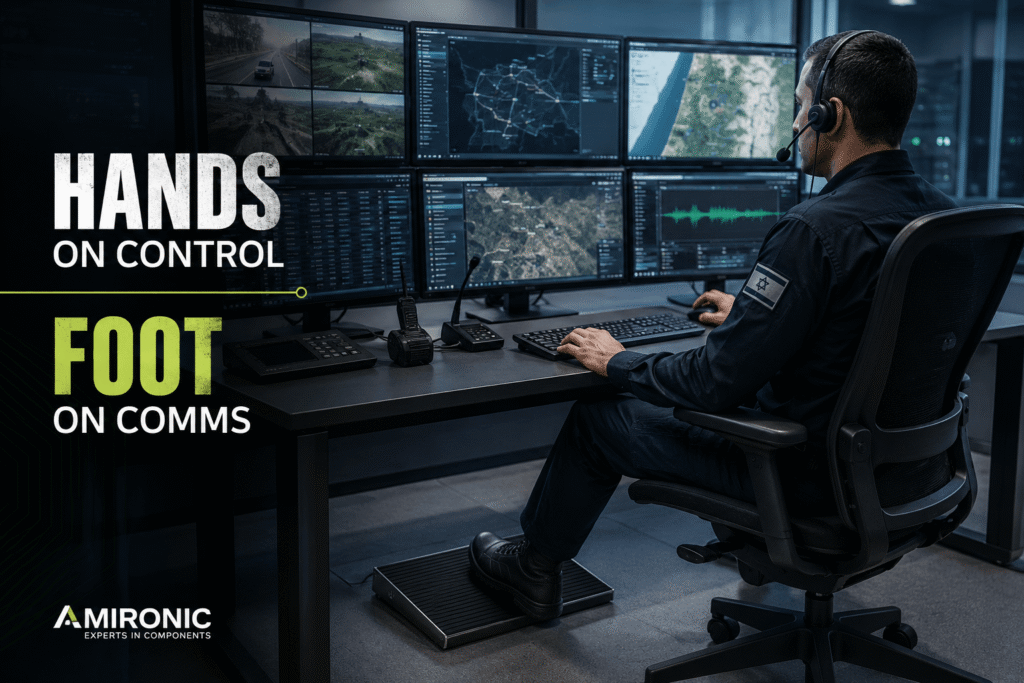
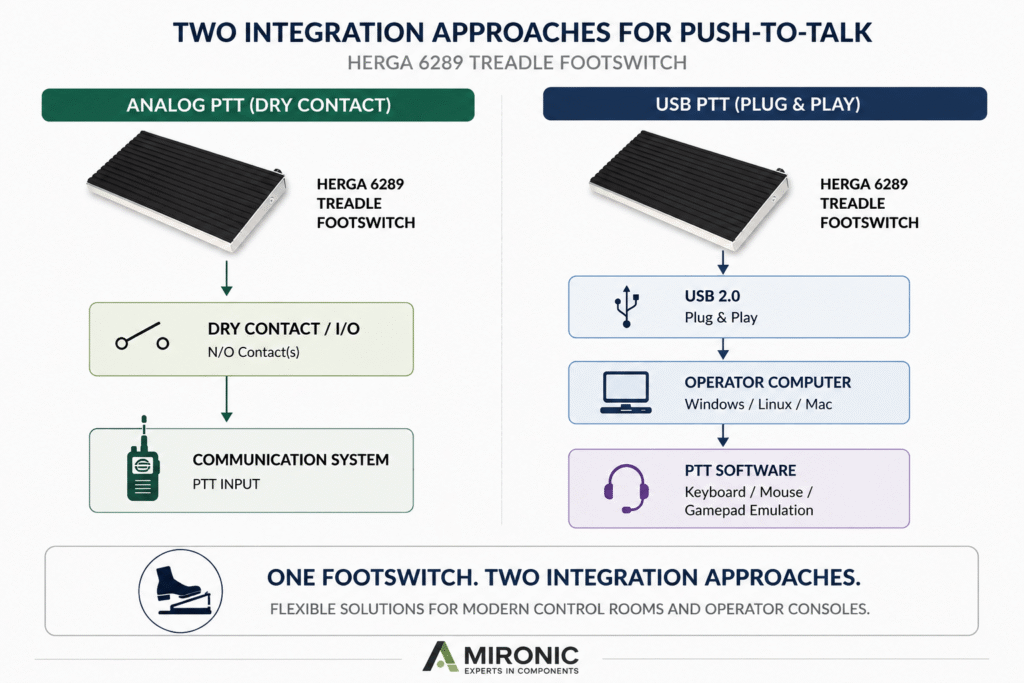
Figure 1: In Command & Control environments, a footswitch separates communication from console operation – the operator’s hands remain on the controls while the foot activates Push-to-Talk.

From Footswitch to PTT Command – Integrating It into the System

Electrically, Push-to-Talk does not have to be a complex interface. In many systems, all that is required is a momentary switching command: the operator presses the switch, the system enters transmit mode; the operator releases it, and the transmission ends.

This simplicity actually provides several ways to integrate a footswitch into an operator console.

The standard Herga 6289 configuration incorporates two Normally Open (N/O) Single Pole switches, while Changeover and Double Pole options are also available. Connection can be made using free cable ends or a connector selected to suit the system. Connector options specified by the manufacturer include 3.5 mm Jack, DIN, and RJ45.

For the system designer, this means the console does not necessarily have to be designed around a specific footswitch interface. In suitable applications, the footswitch interface can be adapted to the console.

For example, pressing the treadle can close a contact connected directly to a dedicated PTT input on the communication system. In another application, the signal can be connected to the console controller’s I/O, with the controller or software then executing the required command.

But there is another approach entirely.

What If Push-to-Talk Is Actually a Software Command?

In modern operator consoles, the boundary between a physical control and a software command is becoming increasingly blurred.

Herga also offers the 6289 in a USB 2.0 Plug & Play version that requires no additional driver installation. According to the datasheet, it can be factory-programmed to emulate Keyboard, Mouse, or Joystick/Gamepad functions and is compatible with Windows, Linux, and Mac.

This opens up an interesting option, particularly for Israeli manufacturers of operator consoles and Command & Control systems.

Consider a communication system controlled through software, where the PTT function is activated by a specific keyboard key. Instead of developing dedicated footswitch electronics, the USB version can potentially be factory-programmed to send the required command.

From the software’s perspective, pressing the footswitch can appear just like pressing a key.

From the operator’s perspective, however, the difference is significant: both hands remain on the controls.

This can be particularly relevant for Israeli manufacturers developing Operator Consoles, Ground Control Stations, Communication Consoles, Dispatch Systems, Training Simulators, and C4I systems, where a computer is already at the heart of the system.

In a Control Room, the Floor Is Part of the Operating Environment Too

A footswitch operates in a location that is not particularly friendly to electronics: the floor.

Shoes, dust, moving chairs, and sometimes liquids are all part of the operating environment. When a footswitch becomes a permanent part of an operator station, its mechanical construction and ingress protection need to be considered alongside its switching function.

The 6289 has a low-profile design with a height of just 25 mm, a black rubber tread, and an aluminum extrusion construction. The datasheet specifies IPX2 or IPX7, with IPX8 available on request.

This leads to an important point when selecting a footswitch for a system manufactured in Israel:

It is not enough to ask, “Can it perform Push-to-Talk?” You also need to ask where it will be installed, who will operate it, how frequently it will be used, what environmental conditions it will face, and how it will interface with the system.

Figure 2: Two approaches to integrating a footswitch into a Push-to-Talk system: a Dry Contact connection directly to the PTT input, or a USB connection to the operator computer with the PTT command handled by software.

Push-to-Talk as Part of Console Ergonomics

Ergonomics in a control room is about more than monitor height or chair position.

It requires looking at the actions the operator performs repeatedly: where the keyboard is positioned, how far away the mouse is, which controls require the operator to move a hand, and which functions could instead be transferred to the feet.

PTT is a natural candidate because it is typically a simple, binary action:

Press – Transmit.
Release – Return to the previous state.

When this function is transferred to the foot, both hands remain available for tasks that require finer motor control.

For example, an unmanned ground system operator can continue using a joystick or mouse while speaking. A control room operator can continue selecting an object on a map. A dispatch operator can continue entering information while communicating it over the radio.

In other words, the benefit is not just Hands-Free Communication.

The real benefit is Parallel Operation – the ability to communicate and operate the system at the same time.

Where Does This Fit into the Israeli Industry?

This is where the solution becomes particularly interesting.

Israel develops and manufactures a wide range of systems in which a human operator works at a console while simultaneously using a communication system. In many of these applications, the footswitch may be a very small component within the overall system – but it sits directly at the interface between the operator and the machine.

Applications worth considering include:

  • Command & Control Consoles – operator stations where multiple systems are controlled simultaneously.
  • Ground Control Stations – control systems for unmanned platforms where voice communication takes place alongside command and monitoring tasks.
  • Tactical Communication Systems – consoles and communication systems where PTT is a central part of the operational workflow.
  • Air Defense & Surveillance Consoles – operator stations where targets are monitored while communicating with other personnel in real time.
  • Naval Operator Consoles – maritime systems combining displays, controls, and communication functions.
  • Emergency & Security Control Rooms – environments where operators may need to enter data, monitor cameras, and communicate simultaneously.
  • Training Simulators – systems designed to reproduce not only the displays of the real system, but also its operational workflow.

For an Israeli manufacturer developing such a system, the question is not necessarily, “Do we need a footswitch?”

A better question is:

Does the operator perform a frequent task that occupies the hands even though it could be performed more naturally with the foot?

If the answer is yes, PTT may be only one of the possibilities.

Not Every Control Room Looks Like an Office

There is another reason not to select a footswitch based solely on its electrical function.

The unit sits on the floor.

Over the lifetime of the system, it may be exposed to wet footwear, cleaning, spilled liquids, or an operating environment where equipment is used continuously for many hours.

Ingress protection therefore becomes part of the system requirements.

The 6289 datasheet specifies IPX2 or IPX7, with IPX8 available on request. Its specified operating temperature range is -5°C to +40°C.

There is an important engineering distinction here: it is not accurate to state simply that “the 6289 is IPX7” without defining the configuration.

The manufacturer’s configuration table also specifies the internal switch module as IPX2 as standard, with IPX7 available on request.

For a real project, the environmental conditions and required level of ingress protection should therefore be defined in advance rather than assuming that every version of the product provides the same level of protection.

What About the Cable and Connector?

Here too, the 6289 provides flexibility to adapt the interface to the application.

The standard version specifies a 2-meter cable, while the USB version comes with a standard cable length of 2.5 meters. The manufacturer offers various connector options for the conventional version, while the USB version is available with USB-A or USB-C.

This may seem like a minor detail, but for an Israeli OEM integrating the footswitch into a production console, these details matter.

The goal is not to receive a footswitch and then figure out how to connect it.

The goal is to define the electrical interface, connector, cable length, contact configuration, ingress protection, and operating function in advance – and select a component that fits the system architecture.

Which brings us to the most practical question:

How should an engineer developing a PTT console in Israel specify the footswitch before selecting a part number?

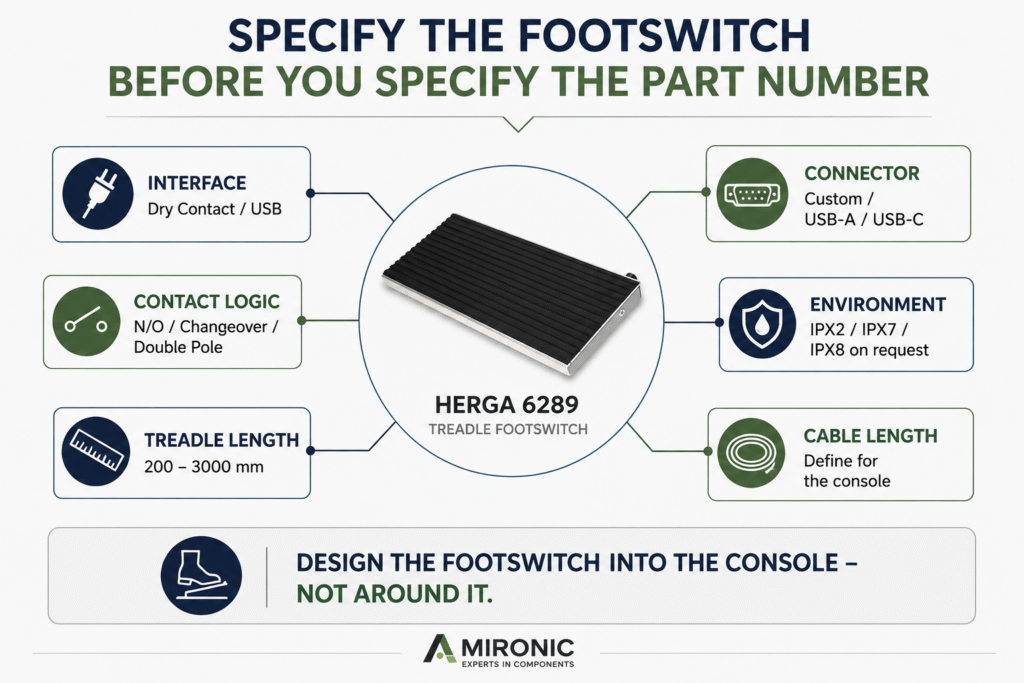
Figure 3: Before selecting a footswitch for an operator console, it is important to define the interface type, contact configuration, treadle length, connector, cable length, and ingress protection required for the application.

How Do You Specify a Footswitch for a Project?

When a footswitch becomes part of a system BOM, it is better not to start with the question, “Which part number is in stock?” Instead, start with the system requirements.

In the case of the Herga 6289, several parameters should be defined early in the design process.

1. What is the footswitch supposed to control?
Is it an electrical PTT input, a controller’s Digital I/O input, or a command sent to a computer via USB?

2. What contact configuration is required?
The standard version incorporates two single-pole N/O switches. Herga also specifies Changeover and Double Pole options for suitable configurations.

3. What treadle length is required?
The standard length is 760 mm, with other lengths available from 200 to 3,000 mm.

This is not simply a mechanical decision. The treadle length should suit the width of the console, the movement range of the operator’s chair, and the area in which the operator needs to access the PTT function.

4. What level of ingress protection is required?
The designer should determine whether IPX2 is sufficient for the operating environment or whether an IPX7 version is required. Herga also specifies IPX8 as an option available on request.

5. What cable and connector should be supplied with the unit?
The conventional electrical version provides flexibility in cable and connector configuration, while the USB version is available with USB-A or USB-C.

For a production system, the footswitch can therefore be treated as an integral part of the operator console rather than an accessory added at the end of the design process.

Case Study: An Israeli-Made Command & Control Console

Consider a typical scenario.

An Israeli manufacturer is developing a Command & Control console for a system in which the operator needs to monitor the operational picture, perform actions using a keyboard and mouse, and simultaneously communicate with other personnel over the radio.

In the initial console design, the Push-to-Talk command is activated by a button located on the operator’s desk.

Electrically, the solution works.

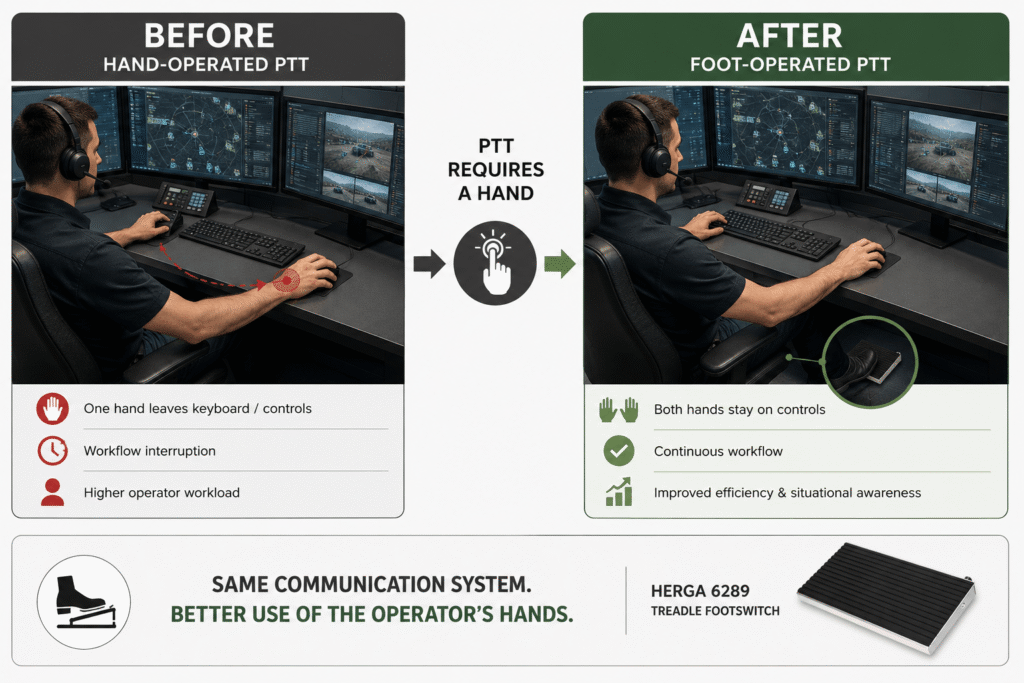
But during Human Factors testing, a problem becomes apparent: every time the operator needs to communicate, one hand has to leave the controls.

If the operator is in the middle of marking a target, changing a display, entering data, or performing another task, the workflow is interrupted.

A Small Change in the Architecture

Instead of changing the communication system itself, only the PTT activation interface can be moved to the floor.

The footswitch can be connected to the existing PTT input using an N/O contact or, alternatively, to the operator computer via USB when PTT is implemented in software.

Now, when communication is required:

The foot activates PTT while the hands keep working.

There is no need to redesign the entire communication system or turn a simple function into a complex solution. The change takes place at the HMI level.

What Do You Gain?

The first and most obvious benefit is Hands-Free Operation, but from a system-design perspective there are additional advantages.

The operator can perform two actions in parallel rather than sequentially. PTT activation becomes less dependent on where the operator’s hands are positioned on the console. A wider activation area can be designed instead of relying on a small button, and in a production system the cable, connector, and interface can be defined in advance to match the system architecture.

However, it is important not to claim that a footswitch “improves response time” by a specific amount without actual ergonomic testing. The 6289 datasheet does not provide Human Factors data or response-time measurements.

A more technically accurate statement is:

Foot-operated PTT allows the operator to communicate without dedicating one hand to the PTT function.

In a mission-oriented system, sometimes that is exactly what is needed.

What If the Software Changes Tomorrow?

This is where the USB version becomes particularly interesting.

Herga specifies that USB versions of the 6289 are Plug & Play and can be factory-programmed to emulate Keyboard, Mouse, or Gamepad functions.

This means that in a computer-based system, it is possible to consider an architecture in which the footswitch is not dependent on a dedicated electrical PTT input.

For example, if the communication software activates PTT using a defined keyboard key, the footswitch can be configured so that pressing it generates the required command.

This can be particularly useful in consoles where functionality gradually moves from dedicated hardware controls toward a Software-Defined HMI.

Instead of designing a new physical button every time the software changes, the physical operator interface can remain in place while the function behind it changes.

Figure 4: Moving from hand-operated Push-to-Talk to footswitch activation allows the operator to keep both hands on the controls while retaining the same communication system and changing only the HMI activation point.

Summary

In Command & Control systems, Push-to-Talk may seem like a simple function – but the location of the PTT control directly affects how the operator interacts with the system.

Moving PTT activation from the hand to the foot allows the operator to continue using the keyboard, mouse, or other control devices while communicating over the radio. In applications where communication and system operation take place simultaneously, the footswitch becomes part of the HMI design rather than just another accessory under the desk.

The Herga 6289 Treadle Footswitch supports this approach through several integration architectures, ranging from conventional electrical contacts to USB Plug & Play, with options for adapting the treadle length, contact configuration, cable, and connector to the application.

🧩 Further Reading

This article is part of a broader series exploring how footswitches function as critical human-machine control interfaces across medical and industrial systems. For additional technical context and application insights, you may also find the following articles useful:

  • HERGA Control Solutions: More Than a Footswitch – The Human Interface That Defines System Performance
  • HERGA Medical Footswitches: Engineering the Right Control Interface for Clinical Systems
  • HERGA Industrial Footswitches: Reliable Control Solutions for Harsh and High-Duty Environments
  • Pneumatic Footswitches in Medical and Aesthetic Equipment
  • Industrial Safety Footswitches: Reliable Machine Control for Heavy-Duty and High-Risk Environments
  • Wired vs Wireless (Bluetooth) Footswitches: When Does It Actually Matter?
  • Footswitches for Medical and Aesthetic Laser Systems – Not Just a Trigger, but a Critical Part of System Safety
  • Medical Footswitches for IEC / UL 60601-1 Systems – Safety, Reliability and Design Considerations Every Engineer Should Know
  • 6 Switching Technologies Every Systems Engineer Should Know – And How to Choose the Right One
  • Why Foot Switches Fail – And What Experienced OEM Designers Do Differently
  • Pneumatic Foot Bellows vs. Electrical Footswitch – Do You Really Need to Run Electricity to the Foot Pedal?
  • Momentary or Latching? How to Choose the Right Switch for Industrial, Medical, and OEM Applications
  • Why Did Your Footswitch Fail After Just Six Months – Even Though It Was Rated for One Million Operations?
  • USB Foot Pedals for Medical & Industrial Systems – Why the USB Connector Is Only Part of the Story
  • Don’t Design a New Footswitch – Build It from a Modular Platform
  • Why Wireless Footswitches Are Becoming the Standard in Mobile Medical Equipment
  • Why a Dirty Lens Is More Than Just an Optical Problem – It’s an Engineering Challenge in Endoscopy Systems

Frequently Asked Questions (FAQ)

What is Push-to-Talk and why is it used in communication systems?

Push-to-Talk, or PTT, is an interface that allows an operator to activate transmission by pressing a control. In systems where the operator needs to communicate while simultaneously using a keyboard, mouse, or other control devices, the PTT function can be transferred to a footswitch, leaving both hands available for other tasks.

What is the advantage of using a footswitch for Push-to-Talk?

The main advantage is the ability to activate communication with the foot without dedicating one of the operator’s hands to the PTT function. This is particularly relevant for Command & Control Systems, Ground Control Stations, Communication Consoles, control rooms, and simulators.

What is the advantage of a Long Treadle compared with a small footswitch?

A Long Treadle provides a wider activation area for the foot, reducing the need for the operator to locate and press a small pedal at a precise position. The standard Herga 6289 is 760 mm wide, with other lengths available from 200 to 3,000 mm.

Can the Herga 6289 connect directly to a PTT input?

The 6289 is available in an electrical-contact configuration, with the standard version incorporating two single-pole N/O switches. Changeover and Double Pole options are also available. Compatibility with a specific PTT input depends on the electrical interface of the communication system.

Can the Herga 6289 also be used with a software-based PTT system?

Yes. A USB 2.0 Plug & Play version is available and requires no additional driver installation. It can be factory-programmed to emulate Keyboard, Mouse, or Gamepad functions, making it possible to consider integration with PTT software that uses a corresponding command.

What connection options are available for the 6289?

The electrical version can be supplied with free cable ends or connectors to suit the application. Connector options specified by the manufacturer include 3.5 mm Jack, DIN, and RJ45. The USB version is available with USB-A or USB-C.

Is the Herga 6289 water-resistant?

The 6289 is offered with IPX2 or IPX7 ingress protection, with IPX8 available on request. The required level of protection should be defined when selecting the appropriate configuration.

Can the 6289 be customized for a system manufactured in Israel?

The manufacturer offers several configuration options, including treadle length, contact configuration, cordset, connectors, and factory-programmed functions for the USB version. It is therefore advisable to define the required interface and configuration during the console design stage.

Key Terms

Push-to-Talk (PTT) – An operating method in which pressing a control activates the communication channel and releasing it ends the transmission.

Footswitch – A foot-operated switch that allows a control function to be performed without using the hands.

Treadle Footswitch – A footswitch with a relatively long and wide activation surface, allowing the switch to be operated across a larger area rather than at a single activation point.

Human-Machine Interface (HMI) – The controls and interfaces through which an operator interacts with a system, including displays, keyboards, mice, buttons, and footswitches.

Normally Open (N/O) – An electrical contact that remains open in its normal state and closes when the switch is activated.

Changeover Contact – A contact arrangement that switches between two electrical paths when activated.

Dry Contact – A passive electrical contact used to provide a switching command without supplying its own voltage.

Digital I/O – A digital input or output used to transfer binary commands between control devices and systems.

USB Plug & Play – A USB connection that allows a system to recognize and operate a device without requiring a dedicated driver installation. The USB version of the 6289 is specified as Plug & Play.

Keyboard / Mouse / Gamepad Emulation – The ability of a USB device to emulate commands from a keyboard, mouse, or game controller. The USB version of the 6289 can be factory-programmed for the required function.

IP Rating – A classification describing the level of protection provided against environmental ingress. The 6289 is available in IPX2 or IPX7 configurations, with IPX8 available on request.

Operator Console – A workstation incorporating the displays, controls, and communication interfaces required to operate a system.

Ground Control Station (GCS) – A ground-based station used to control, monitor, and communicate with an unmanned platform or system.

Command & Control (C2) – Systems that combine information, communications, and operator interfaces to support operational management and decision-making.

Tags: Herga

Related Articles

Medical Footswitch Design Platform: A Modular Solution for Precision in Healthcare

26/02/2025amironicLTD

How Differential Pressure (ΔP) Can Reveal Problems Long Before a System Shuts Down

03/06/2026amironicLTD

6 Switching Technologies Every Systems Engineer Should Know – And How to Choose the Right One

17/06/2026amironicLTD

Recent Posts

  • Hands on the Keyboard, Foot on the Radio – Why Push-to-Talk Is Moving to the Floor in Control Rooms
  • Why Every Battery Pack Needs a Temperature Sensor – Not Just Electric Vehicles
  • Why a Dirty Lens Is More Than Just an Optical Problem – It’s an Engineering Challenge in Endoscopy Systems
  • The Antenna Hasn’t Moved – So Why Did We Lose the Link? The Role of the IMU in Antenna Positioning Systems
  • Why a Standard Thermal Circuit Breaker Isn’t Always the Right Choice for Data Centers

Categories

  • Air Switch
  • Circuit Breakers
  • Elapsed Time Indicator
  • Feedthrough
  • Footswitches
  • Gears & Transmission
  • Hour Meters
  • Infra Red Switches
  • INFRARED LAMPS
  • Low Noise Inertial MEMS
  • Mechanics
  • MEMS Gyroscope
  • MEMS Inertial
  • Microelectronics
  • Motors
  • Position Sensors
  • Power Supply
  • Pressure Sensors
  • Pressure Switch
  • Temperature Sensors
  • Tungsten and Molybdenum
  • Uncategorized
  • Vacuum Switches

Quick Contact

Fill out the form and our representatives will return to you

    Name (required)

    Email (required)

    Phone

    Message

    This site is protected by reCAPTCHA and the Google
    Privacy Policy and
    Terms of Service apply.

    Amironic Ltd.

    3 Rabinovich Street, Petah Tikva 4928144 , Israel. Tel: +972-3-9047744 E-mail: office@amironic.co.il
    Email
    Facebook
    Twitter
    LinkedIn
    YouTube
    Press on the ISO Certificate below for download
    ISO 9001:2015 Certification
    • MEMS Inertial
    • Circuit Breakers
    • Footswitches
    • Mechanical & Transmisions
    • Sensors
    • Motors
    • Electronics
    • Hand Control
    • Power Solutions

    News

    • Hands on the Keyboard, Foot on the Radio – Why Push-to-Talk Is Moving to the Floor in Control Rooms
    • Why Every Battery Pack Needs a Temperature Sensor – Not Just Electric Vehicles
    • Why a Dirty Lens Is More Than Just an Optical Problem – It’s an Engineering Challenge in Endoscopy Systems
    • The Antenna Hasn’t Moved – So Why Did We Lose the Link? The Role of the IMU in Antenna Positioning Systems
    • Why a Standard Thermal Circuit Breaker Isn’t Always the Right Choice for Data Centers
    About AmironicContactעברית
    © 2022 Amironic All rights reserved. All Trademarks are the property of their respective owners.
    • Increase Font
    • Decrease Font
    • Black & White
    • Inverse Colors
    • Highlight Links
    • Regular Font
    • Reset