flagעברית
flagEnglish
3 Rabinovich St., Petah-Tikva, Israel
+972 3 9047744
office@amironic.co.il
Facebook
Twitter
LinkedIn
YouTube
  • Products
    • MEMS Inertial
      • Gyros & Accels
      • IMU
      • Inertial Navigation
      • AHRS
    • Circuit Breakers
      • Airpax Circuit Breakers
      • Electronic Circuit Breakers
      • Aircraft Circuit Breakers
      • Thermal Circuit Breakers
      • Sealing Solutions & Guards
    • Footswitches
      • Pedals & Bellows
      • USB
      • Air Switches
      • Medical
      • Modular Bases System
      • Industrial
      • Foot Potentiometers
      • Wireless
    • Mechanical & Transmisions
      • Gears
      • Sealing Solutions
      • Gearboxes
      • Couplings
      • Shafts & Bearings
      • Fasteners
      • Mechanical & Springs
      • Linear Motion
      • Anti-Vibration
    • Sensors
      • Thermostats
      • Temperature
      • Position
      • Pressure
      • Speed
      • Level Sensor
      • Load Cells
      • Flex Sensors
      • Membrane Potentiometer
    • Motors
      • Geared DC
      • Brushless DC
      • Step Motors with Gearbox
      • Torque Motors & Brushless Servo
      • DC Motors
    • Electronics
      • Xenon & IR Lamps
      • Counters & Meters
      • Microelectronics Packaging
      • Waterproof Switches
      • Micro Switches
    • Hand Control
      • Operator Controls (JOYSTICK)
      • Electrical
      • Pneumatic (Medical)
      • USB Hand Control
      • Air Push Button
      • Pressure Switch
      • IR Switch
    • Power Solutions
      • Rugged & Military Power Supply
      • Input Power Protection
      • Sealed Military Power Adaptor
      • Triple Output Military Power Supply Series – up to 250 W
    • Materials
      • Molybdenum and Advanced Alloys (TZM, MOLA, HCT)
      • Tungsten (Wolfram) and Advanced Alloys – High-Performance Materials for Extreme Conditions
      • Materials for Gears
  • Shop
  • Companies
  • About Amironic
  • News
  • Contact
Product was added to your cart

Cart

waze

Electrical, Pneumatic, USB, Bluetooth or Contactless – How Do You Choose the Right Switch for Your System?

Footswitches07/09/2026amironicLTD

Choosing a switch can often seem like one of the simplest decisions in system design.

You need to activate a function, select a suitable switch, connect it to the system, and move on.

In practice, however, the switch is the interface between the user, the operating environment, and the control system. Choosing the wrong solution can therefore lead to problems involving safety, reliability, ergonomics, cleaning, wiring, and system integration.

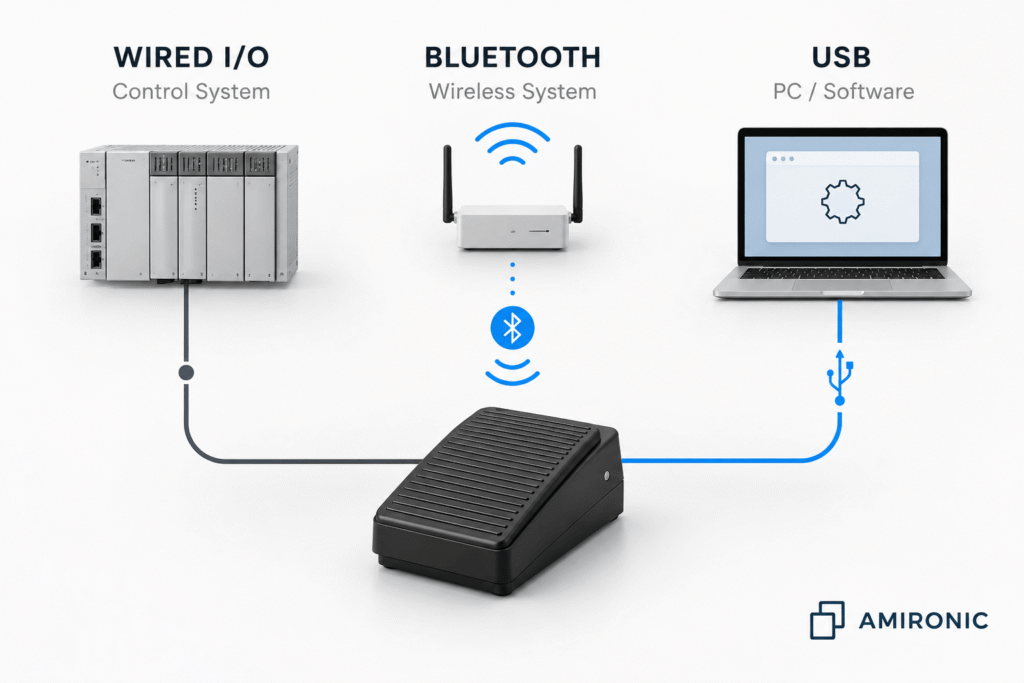
Today, medical, industrial, and OEM systems can use a wide range of switching technologies, including conventional electrical switches, footswitches, pneumatic switches, contactless sensors, Bluetooth, USB, and pressure or vacuum switches.

The right question is therefore not simply:

“Which switch meets the electrical requirements?”

But rather:

“Which switching technology best matches the way the system will actually be used?”

In this guide, we look at the key questions engineers should ask before selecting a switch.


1. Should There Be Electricity at the Point of Actuation?

This is one of the first questions worth asking.

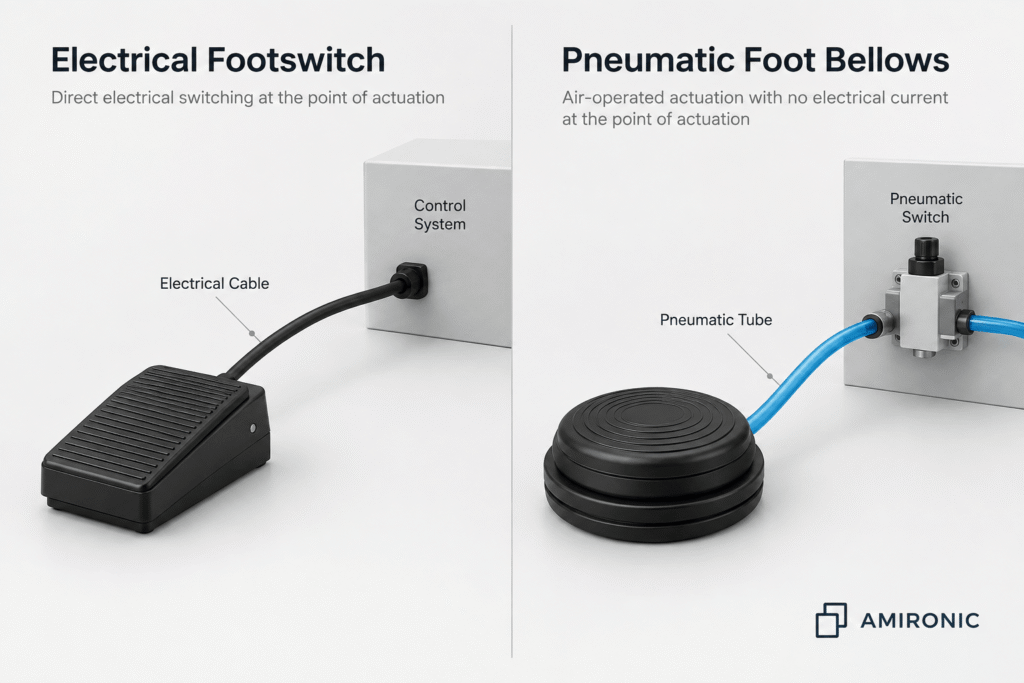
With a conventional electrical switch, the user’s action is translated directly into electrical switching. It is a simple, well-established, and reliable solution suitable for a very wide range of systems.

However, there are applications where having electrical wiring and contacts at the point of actuation is undesirable.

For example:

  • Wet environments
  • Certain medical equipment
  • Applications where separation between the user and the electrical circuit is required
  • Systems where the point of actuation is exposed to liquids or frequent cleaning

In these situations, a pneumatic switch may be worth considering.

The user presses a pneumatic bellows or actuator, creating a change in air pressure inside a tube. The electrical switch itself can then be located elsewhere in the system.

In other words, electrical switching can be kept away from the actual point of actuation.

This is a good example of why switch selection should not begin with current and voltage ratings alone. It should begin with the operating environment and the architecture of the system.
2. Does the User Need to Keep Their Hands Free?

Sometimes the most important question is not which switching technology is required, but how the user is expected to operate the system.

A surgeon, physician, technician, machine operator, or production-line worker may need both hands to perform the primary task. In such cases, a hand-operated switch may be inconvenient and can sometimes interfere with the workflow.

This is where a footswitch offers a clear advantage.

Moving the control function to the foot allows the user to continue working with both hands while simultaneously controlling another function within the system.

Footswitches are commonly used for:

  • Starting and stopping equipment
  • Operating tools and machinery
  • Controlling medical equipment
  • Activating medical or aesthetic laser systems
  • Push-to-Talk in control rooms
  • Changing operating modes
  • Sending commands to software or a computer

However, deciding that “we need a footswitch” is only the beginning of the selection process.

Additional questions need to be considered:

  • Is a single pedal or a multi-pedal configuration required?
  • Should the operation be Momentary or Latching?
  • Is protection against accidental activation required?
  • What actuation force is appropriate?
  • Does the operator need clear tactile feedback?
  • Should the footswitch be portable or fixed in position?
  • Will it be exposed to water, dust, cleaning agents, or mechanical stress?

In a system where unintended activation could trigger an unwanted action, the mechanical design and ergonomics of the switch are part of the system design, not simply a matter of user comfort.

This is also why two footswitches that appear to perform exactly the same electrical function may be suitable for completely different applications.

3. Is Physical Contact with the Switch Even Desirable?

We are accustomed to thinking of a switch as something that needs to be pressed.

But not every system requires physical contact.

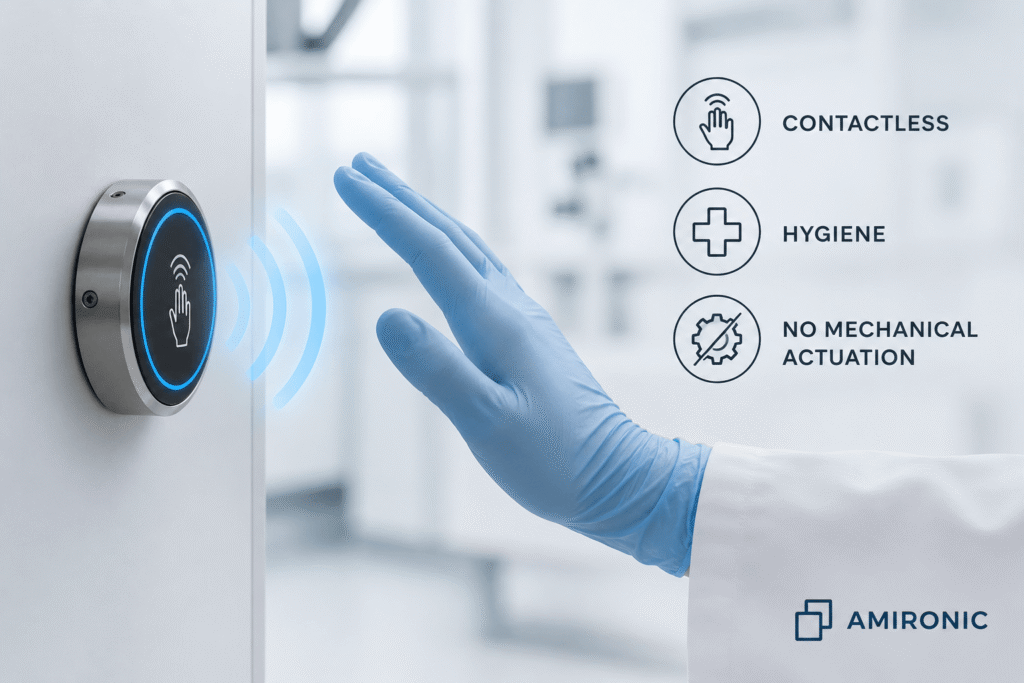
A contactless switch, for example one based on infrared sensing, can detect the approach of a hand or object and generate an activation command without conventional mechanical actuation.

This can be particularly useful in environments where there is a need for:

  • Improved hygiene
  • Fewer shared touchpoints
  • Frequent cleaning
  • Reduced mechanical wear
  • Operation where physical contact is inconvenient or undesirable

Potential applications include medical equipment, sanitary systems, automatic door controls, washroom systems, and other touch-free controls.

The absence of a conventional mechanical actuation mechanism can also be beneficial in applications involving a very high number of operating cycles.

However, contactless is not necessarily better than mechanical switching.

The actual operating environment needs to be considered.

Dust, steam, dirt, obstructions, sensing distance, installation geometry, and reflective surfaces may affect sensing performance, depending on the technology and application.

There are also systems where it is important for the operator to physically feel that an action has taken place.

A mechanical switch can provide clear tactile feedback that may be more difficult to achieve with a contactless solution.

So the right question is not:

“Can we use a contactless switch?”

But rather:

“Does eliminating physical contact solve a real problem in the system?”

If the answer is yes, contactless switching becomes a very interesting option.

4. Is the Cable Part of the Problem?

In a fixed system, a cable between the switch and the control system can be the simplest and most reliable solution.

However, in mobile systems, medical equipment, or systems that are frequently reconfigured, the cable itself can become part of the problem.

It needs to be routed, connected and disconnected, kept out of the user’s way, and considered whenever the equipment is cleaned or moved.

A cable running across the floor can also restrict the position of the footswitch or create an additional point of mechanical wear.

This is where wireless footswitches, particularly Bluetooth-based solutions, can offer an advantage.

Eliminating the cable can be particularly useful when the application requires:

  • Freedom in footswitch positioning
  • Mobile medical or industrial equipment
  • Frequent changes to the working environment
  • Fewer cables around the operator
  • Easier cleaning of the workspace
  • The ability to reposition the footswitch according to the user’s position

However, wireless is not automatically an upgrade over a wired solution.

Once the cable is removed, a new set of questions enters the design:

  • How is pairing handled?
  • What communication range is required?
  • How is power consumption managed?
  • What battery life is required?
  • How does the system indicate a low battery?
  • What happens if communication is lost?
  • How does the system recover after a connection is lost?
  • Do the application’s safety and system requirements allow wireless communication?

The decision between wired and wireless should therefore not be based on which technology is newer.

The right question is:

Does eliminating the cable provide an operational benefit that justifies the additional complexity of a wireless system?

In a fixed installation where the cable does not interfere with operation, a wired solution may still be the simpler and more appropriate choice.

In a mobile system where the footswitch is regularly moved from one position to another, however, wireless operation can significantly improve usability.

5. Does the Switch Need to Communicate Directly with a Computer?

Not every activation command needs to be routed through a PLC or dedicated I/O circuit.

Many medical systems, test systems, laboratory instruments, and workstations are now based around a PC and software.

In these applications, a USB footswitch can be used to send a user’s command directly to the computer environment.

The concept can be relatively simple: the user presses the footswitch and the software performs a predefined action.

For example:

  • Starting or stopping a process
  • Moving between screens
  • Activating a software function
  • Capturing or saving information
  • Controlling a diagnostic system
  • Hands-free interaction with software
  • Activating Assistive Technology functions

One advantage is that it may eliminate the need to add a separate I/O controller simply to receive an operator command.

However, it is important to separate two different considerations:

USB is a communication interface. It does not define the quality or suitability of the footswitch itself.

Even when the connection to the computer is straightforward, the footswitch still needs to be selected according to the application.

Factors to consider include:

  • Mechanical durability
  • Number of operating cycles
  • Actuation force
  • Number of pedals or functions
  • Suitability for the operating environment
  • Required ingress protection
  • Ergonomics
  • Operating system or software compatibility
  • How the computer recognizes and interprets the command

A simple office USB footswitch and a USB footswitch designed for medical or industrial equipment may use the same familiar connector, yet be completely different products in terms of construction, durability, and suitability for the application.

Therefore, when a system specification simply states:

“USB Footswitch required”

that is still not enough information to select the right product.

You need to understand what the user will do with the footswitch, the environment in which it will operate, and what it will be exposed to throughout the life of the system.

6. Is It Even a User Command?

So far, we have mainly discussed switches that receive a command from a person.

But not every switch is designed to be physically operated by a user.

In many systems, the requirement is to detect a physical condition within the system itself and respond to it.

For example:

  • Is there airflow?
  • Has a vacuum been created?
  • Has the pressure crossed a certain threshold?
  • Is a filter beginning to clog?
  • Is an extraction system operating correctly?
  • Has a particular process condition changed?

In these situations, a pressure switch or vacuum switch can be used.

Unlike a footswitch or pushbutton, there is not necessarily a human operator involved. A change in pressure or vacuum is what actuates the switch.

For example, in an extraction system, pressure or vacuum monitoring can be used to detect changes in operating conditions. As a filter becomes clogged, the pressure or airflow characteristics of the system may change. Detecting this change can be used for an alarm, control function, or as part of an interlock mechanism.

The switch therefore changes from being part of the Human-Machine Interface to becoming part of the system’s Monitoring and Control functionality.

This distinction is important from the very beginning of the design process.

Before asking, “Which switch do we need?”, it is worth asking:

What event are we actually trying to detect?

A user pressing a switch?
A hand approaching a sensor?
A change in pressure?
The creation of a vacuum?
Or perhaps a command coming from software?

Only after defining the event can the appropriate switching technology be selected.

7. What Happens When Something Goes Wrong?

A real system needs to be designed not only for normal operation.

It also needs to account for failure conditions.

What happens if:

  • A cable breaks?
  • A connector becomes disconnected?
  • The battery in a wireless footswitch runs out?
  • Wireless communication is lost?
  • A mechanical switch becomes stuck?
  • The user releases the footswitch?
  • A pneumatic tube becomes disconnected?
  • Liquid enters the actuation area?

These questions are particularly important when the switch command controls machinery, medical equipment, or another function with safety implications.

This introduces considerations such as:

Normally Open or Normally Closed

Is the circuit open or closed in its normal state?

This choice can affect the system’s ability to detect a disconnection or wiring fault, depending on the control architecture.

Momentary or Latching

Should the function remain active only while the user operates the switch, or should a single actuation change the system state until the next command?

This is not simply a matter of convenience. The operating mode should match the logic and risk profile of the application.

Wired or Wireless

With a wireless solution, the system’s behavior in the event of lost communication or a low battery should be defined in advance.

Electrical or Pneumatic

A pneumatic solution can keep electrical switching away from the point of actuation, but the system still needs to account for possible damage to or disconnection of the air tube.

The goal is not to select a switch that will never fail.

The goal is to design a system that behaves in a defined way even when a failure occurs.

This is part of the Fail-Safe design principle.

It is important to emphasize that a switch alone does not make a system fail-safe. Safe behavior under fault conditions depends on the entire system architecture, including the switch, wiring, electronics, software, diagnostic mechanisms, and control logic.

So, Where Do You Start?

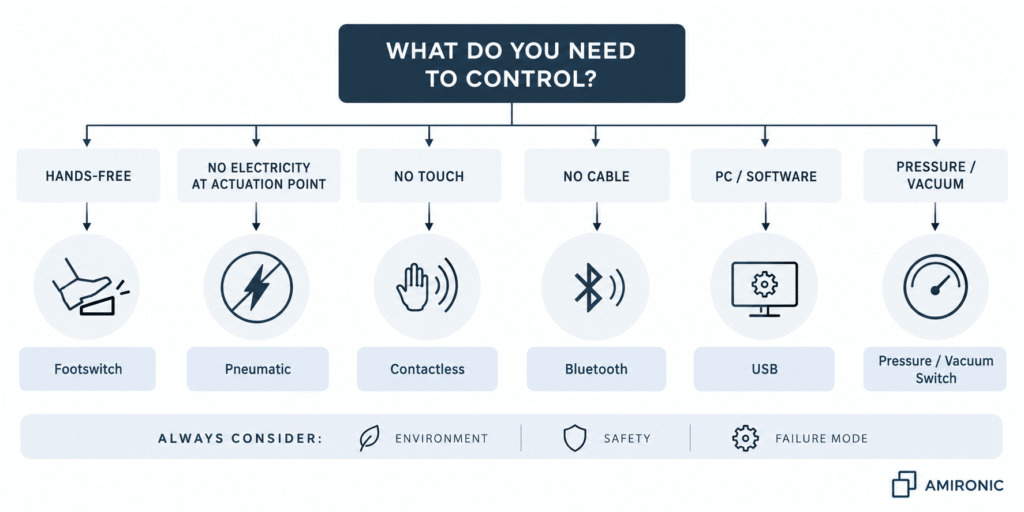
After looking at the different options, the selection process can be narrowed down to a few straightforward questions.

1. What triggers the command?

A person, software, or a physical change within the system?

2. Does the user need to keep their hands free?

If so, a footswitch is a natural option to consider.

3. Is it desirable to have electricity at the point of actuation?

If not, a pneumatic solution may be worth considering.

4. Is avoiding physical contact important?

If so, a Contactless / Infrared solution may be suitable.

5. Does the cable interfere with the way the system is used?

If so, Bluetooth or another suitable wireless solution can be considered.

6. Is the command intended to go directly to a computer or software?

If so, a USB footswitch may simplify integration.

7. Do you need to detect pressure, vacuum, or a process condition?

In that case, Pressure / Vacuum Switching should be considered rather than a conventional operator-actuated switch.

8. What happens in the event of a failure?

This question should be asked for every option.

Quick Selection Table

There is no single switching technology that is right for every system. Each solution has its own advantages, limitations, and operating environments where it becomes a more natural choice.

System Requirement Technology to Consider Why?
General machine or equipment control Electrical Switch Simple, direct solution available in a wide range of configurations
User needs both hands free Footswitch Enables hands-free operation
No electricity desired at the point of actuation Pneumatic Actuation at the user interface is transmitted by air pressure
Physical contact should be minimized Contactless / Infrared Enables activation without physical pressing
Mobile equipment or cables interfere with operation Bluetooth / Wireless Provides greater positioning flexibility and reduces cabling
Direct control of a computer or software USB Provides a relatively direct interface to a PC
Detection of pressure, vacuum, or process changes Pressure / Vacuum Switch The command is generated by a system condition rather than by a user

This table is only a starting point.

For example, the fact that a medical system requires hands-free operation does not mean that every medical footswitch will be suitable. Sealing requirements, cleaning procedures, mechanical design, contact configuration, electrical interface, method of operation, and the relevant system requirements still need to be considered.

Similarly, the fact that a system is connected to a computer does not automatically mean that USB is the right solution. The system architecture may require a different I/O interface, or the command may need to pass through the system controller.

The Common Mistake: Starting with the Part Number Instead of the Application

One of the most common mistakes in switch selection is starting the product search too early.

An engineer searches for:

Footswitch, SPDT, IP67

and finds dozens of options that appear suitable.

But this specification still does not tell us:

  • Who will operate the footswitch?
  • How many times per day will it be used?
  • Will the operator be standing or sitting?
  • Is there a risk of accidental activation?
  • Will the footswitch be washed or frequently cleaned?
  • Will it be moved from one location to another?
  • Will the cable be dragged across the floor?
  • Is continuous activation required, or only a pulse?
  • What should the system do if the footswitch is disconnected?
  • Where does the command actually need to go?

Two products with similar electrical specifications can behave very differently within the actual application.

For OEM design, it is therefore better to follow this sequence:

Application → Environment → Human Interface → Safety → System Interface → Switching Technology → Product

Rather than:

Product → Datasheet → Can we somehow make it fit the system?

Checklist for Selecting a Switch for an OEM System

Before selecting a specific product, it is worth defining the following requirements.

Method of Actuation

  • Hand or foot?
  • Contact or contactless?
  • Momentary or Latching?
  • Single function or multiple functions?
  • Is tactile feedback required?

Operating Environment

  • Indoor or outdoor?
  • Water or moisture?
  • Dust and contamination?
  • Cleaning agents?
  • Medical or industrial environment?
  • Is a specific ingress protection rating required?

System Interface

  • Electrical contacts?
  • USB?
  • Bluetooth?
  • Pneumatic?
  • Pressure / Vacuum?
  • Another controller interface?

Use and Ergonomics

  • How many operating cycles are expected?
  • Will the user be standing or sitting?
  • Does the footswitch need to remain firmly in position?
  • Is there a risk of accidental activation?
  • Could the cable interfere with operation?

Behavior Under Fault Conditions

  • What happens if the cable is disconnected?
  • What happens if communication is lost?
  • What happens when the battery is low?
  • What happens when the switch is released?
  • Can the system detect a fault?
  • What is the safe state the system should enter?

Only after these questions have been answered should the selection process move on to a specific product.

Not Every System Needs the Most Advanced Technology

It is easy to assume that wireless is better than wired, contactless is better than mechanical, or USB is better than a simple electrical contact.

But in engineering design, simpler can be better when it properly meets the requirements.

If a machine is installed in a fixed location and the cable does not interfere with operation, there may be no real benefit in adding wireless communication and a battery.

If hygiene or mechanical wear is not a concern, a mechanical switch can be an excellent solution.

And if all the controller needs is a dry contact, there may be no reason to add USB.

On the other hand, when a cable genuinely interferes with operation, when electricity at the point of actuation is undesirable, or when touch-free activation is required, changing the switching technology can solve a system-level problem rather than simply replace one component with another.

Conclusion – Don’t Just Choose a Switch, Choose the Right Way to Control the System

A switch may be a small component, but it sits at the point where the user, the operating environment, and the control system meet.

Selecting the right switch therefore does not begin with the question:

“What voltage and current can it switch?”

It begins with broader questions:

Who will operate it?
In what environment?
Is physical contact required?
Is a cable appropriate?
Should electricity be present at the point of actuation?
Where does the command need to go?
And what happens when something goes wrong?

Only after answering these questions does it make sense to choose between Electrical, Pneumatic, Contactless, Bluetooth, USB, Pressure/Vacuum, or another switching technology.

HERGA Technology, represented in Israel by Amironic, offers a wide range of switching technologies for medical, industrial, and OEM systems, including footswitches, pneumatic switches, pressure and vacuum switches, infrared switches, Bluetooth, and USB solutions.

For applications where a standard product does not fully meet the requirements, customized configurations and application-specific solutions can also be considered.

The goal is not to find the switch with the longest list of features.

The goal is to select the simplest, safest, and most appropriate interface for the system.

🧩 Further Reading

This article is part of a broader series exploring how footswitches function as critical human-machine control interfaces across medical and industrial systems. For additional technical context and application insights, you may also find the following articles useful:

  • HERGA Control Solutions: More Than a Footswitch – The Human Interface That Defines System Performance
  • HERGA Medical Footswitches: Engineering the Right Control Interface for Clinical Systems
  • HERGA Industrial Footswitches: Reliable Control Solutions for Harsh and High-Duty Environments
  • Pneumatic Footswitches in Medical and Aesthetic Equipment
  • Industrial Safety Footswitches: Reliable Machine Control for Heavy-Duty and High-Risk Environments
  • Wired vs Wireless (Bluetooth) Footswitches: When Does It Actually Matter?
  • Footswitches for Medical and Aesthetic Laser Systems – Not Just a Trigger, but a Critical Part of System Safety
  • Medical Footswitches for IEC / UL 60601-1 Systems – Safety, Reliability and Design Considerations Every Engineer Should Know
  • 6 Switching Technologies Every Systems Engineer Should Know – And How to Choose the Right One
  • Why Foot Switches Fail – And What Experienced OEM Designers Do Differently
  • Pneumatic Foot Bellows vs. Electrical Footswitch – Do You Really Need to Run Electricity to the Foot Pedal?
  • Momentary or Latching? How to Choose the Right Switch for Industrial, Medical, and OEM Applications
  • Why Did Your Footswitch Fail After Just Six Months – Even Though It Was Rated for One Million Operations?
  • USB Foot Pedals for Medical & Industrial Systems – Why the USB Connector Is Only Part of the Story
  • Don’t Design a New Footswitch – Build It from a Modular Platform
  • Why Wireless Footswitches Are Becoming the Standard in Mobile Medical Equipment
  • Why a Dirty Lens Is More Than Just an Optical Problem – It’s an Engineering Challenge in Endoscopy Systems
  • Hands on the Keyboard, Foot on the Radio – Why Push-to-Talk Is Moving to the Floor in Control Rooms
  • Why Run Electricity to the Button When Herga Can Switch It with Air?

Key Terms

Footswitch
A foot-operated switch that allows the user to control a system function while keeping both hands free.

Pneumatic Switch
A switching system in which the user’s action is transmitted through a change in air pressure, allowing the electrical switching element to be located away from the point of actuation.

Contactless Switch
A switch that does not require conventional mechanical actuation and uses sensing technology, such as infrared, to detect the user’s action.

Bluetooth Footswitch
A footswitch that transmits commands via Bluetooth communication instead of a conventional communication cable.

USB Footswitch
A footswitch with a USB interface used to send commands to a computer or compatible system.

Pressure Switch
A switch that changes state when pressure reaches a defined condition or threshold for the application.

Vacuum Switch
A switch designed to detect a vacuum condition or a change in vacuum within a system.

Momentary
An operating mode in which the switch changes state while actuated and returns to its normal state when released.

Latching
An operating mode in which actuation changes the state of the switch and it remains in that state until another actuation or an appropriate release mechanism occurs.

Fail-Safe
A design approach that considers how a system should behave in the event of a failure, with the objective of bringing the system to a defined safe state where required and feasible.

Frequently Asked Questions

Which Is Better – a Wired Footswitch or Bluetooth?

There is no single answer for every system. A wired connection can be simpler and more predictable, while Bluetooth can provide significant advantages when a cable interferes with operation, mobility, or workspace organization. The choice should be based on the requirements of the application.

When Should a Pneumatic Switch Be Used?

A pneumatic switch can be considered when electrical switching at the point of actuation is undesirable, for example in certain applications exposed to water or where separating the electrical switching element from the user interface benefits the system architecture.

Is a Contactless Switch Always More Reliable Than a Mechanical Switch?

Not necessarily. Eliminating mechanical contact can reduce certain types of wear, but contactless sensing introduces other considerations, including the installation environment, dust, steam, obstructions, and sensing distance. The technology should be selected according to the actual application.

Is Every USB Footswitch Suitable for a Medical System?

No. USB only describes the connection interface. Suitability for medical equipment depends on the product design, operating environment, system requirements, and applicable standards.

What Is the Difference Between a Footswitch and a Pressure Switch?

A footswitch typically receives a command from an operator. A pressure switch responds to a change in pressure within a system or process. They therefore detect two fundamentally different types of events.

Does the Choice Between Normally Open and Normally Closed Matter?

Yes. The choice can affect the control logic and how the system responds to or detects certain fault conditions. It should be defined as part of the system design rather than selected simply according to switch availability.

What Should Be Defined Before Selecting a Switch?

At a minimum, define the required function, operating environment, method of actuation, system interface, mechanical and electrical requirements, expected operating frequency, and required behavior under fault conditions.

Tags: Herga

Related Articles

Footswitches for Medical and Aesthetic Laser Systems – Not Just a Trigger, but a Critical Part of System Safety

14/05/2026amironicLTD

Pneumatic Foot Bellows vs. Electrical Footswitch – Do You Really Need to Run Electricity to the Foot Pedal?

06/07/2026amironicLTD

Durable and reliable footswitches

06/10/2016amironicLTD

Recent Posts

  • Electrical, Pneumatic, USB, Bluetooth or Contactless – How Do You Choose the Right Switch for Your System?
  • Military DC-DC Converters with Built-In EMI Filtering and Input Protection
  • MIL-STD-1275 vs. MIL-STD-704 – What’s the Difference and How Do You Choose the Right Power Supply?
  • You Don’t Always Need to Measure Temperature – Sometimes You Just Need to Know When to Stop
  • MIL-STD-810 – Vibration, Shock and Environmental Conditions in Military Power Supplies

Categories

  • Air Switch
  • Circuit Breakers
  • Elapsed Time Indicator
  • Feedthrough
  • Footswitches
  • Gears & Transmission
  • Hour Meters
  • Infra Red Switches
  • INFRARED LAMPS
  • Low Noise Inertial MEMS
  • Mechanics
  • MEMS Gyroscope
  • MEMS Inertial
  • Microelectronics
  • Motors
  • Position Sensors
  • Power Supply
  • Pressure Sensors
  • Pressure Switch
  • Temperature Sensors
  • Tungsten and Molybdenum
  • Uncategorized
  • Vacuum Switches

Quick Contact

Fill out the form and our representatives will return to you

    Name (required)

    Email (required)

    Phone

    Message

    This site is protected by reCAPTCHA and the Google
    Privacy Policy and
    Terms of Service apply.

    Amironic Ltd.

    3 Rabinovich Street, Petah Tikva 4928144 , Israel. Tel: +972-3-9047744 E-mail: office@amironic.co.il
    Email
    Facebook
    Twitter
    LinkedIn
    YouTube
    Press on the ISO Certificate below for download
    ISO 9001:2015 Certification
    • MEMS Inertial
    • Circuit Breakers
    • Footswitches
    • Mechanical & Transmisions
    • Sensors
    • Motors
    • Electronics
    • Hand Control
    • Power Solutions

    News

    • Electrical, Pneumatic, USB, Bluetooth or Contactless – How Do You Choose the Right Switch for Your System?
    • Military DC-DC Converters with Built-In EMI Filtering and Input Protection
    • MIL-STD-1275 vs. MIL-STD-704 – What’s the Difference and How Do You Choose the Right Power Supply?
    • You Don’t Always Need to Measure Temperature – Sometimes You Just Need to Know When to Stop
    • MIL-STD-810 – Vibration, Shock and Environmental Conditions in Military Power Supplies
    About AmironicContactעברית
    © 2022 Amironic All rights reserved. All Trademarks are the property of their respective owners.
    • Increase Font
    • Decrease Font
    • Black & White
    • Inverse Colors
    • Highlight Links
    • Regular Font
    • Reset